We will be using the basic security feature of Spring Security and later on we will expand on this.
- JDK
- Eclipse
- Spring Core
- Spring Security
- Some additional jars
Project Creation
- Create a new “Dynamic Web Project” In Eclipse.
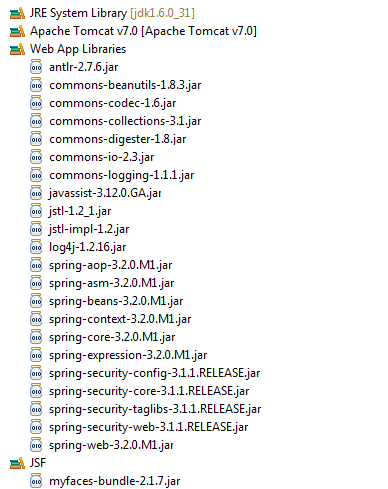
- Add all the required libraries as shown below.
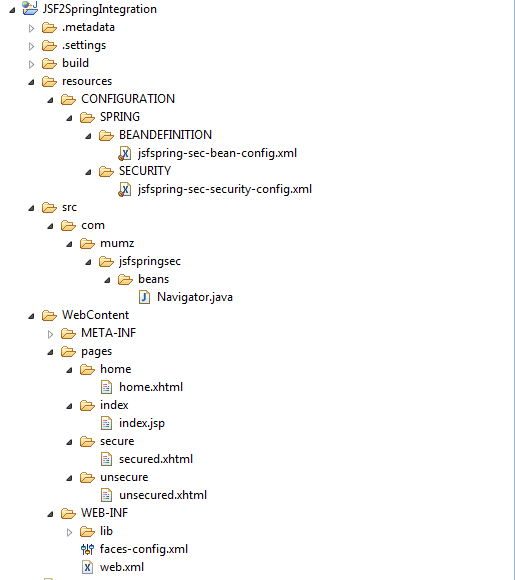
- Under “WebContent” create a folder called as “pages“
- Create four folders under pages namely home, index, secure, unsecure

home.xhtml. It is a simple page with one text field and one command button for navigating.<!DOCTYPE html PUBLIC "-//W3C//DTD XHTML 1.0 Transitional//EN"
"http://www.w3.org/TR/xhtml1/DTD/xhtml1-transitional.dtd">
<html xmlns="http://www.w3.org/1999/xhtml"
xmlns:h="http://java.sun.com/jsf/html"
xmlns:f="http://java.sun.com/jsf/core"
xmlns:ui="http://java.sun.com/jsf/facelets">
<h:head>
</h:head>
<h:body>
<h:form id="homePageFormId">
<h:outputLabel
value="Select your resource, depending on selection you may be asked to login"></h:outputLabel>
<br></br>
<h:inputText name="option" value="#{navigator.pageToNavigate}" id="optionId" required="True" requiredMessage="Please Enter page to navigate, valid values are ToSecure and ToUnSecure"></h:inputText>
<h:commandButton value="Navigate" action="#{navigator.navigateTo}">
</h:commandButton>
</h:form>
</h:body>
</html>
[/sourcecode]
secured.xhtml. We will secure this page using spring security.
secured.xhtml[sourcecode language=”xhtml”]
<!DOCTYPE html PUBLIC "-//W3C//DTD XHTML 1.0 Transitional//EN"
"http://www.w3.org/TR/xhtml1/DTD/xhtml1-transitional.dtd">
<html xmlns="http://www.w3.org/1999/xhtml"
xmlns:h="http://java.sun.com/jsf/html"
xmlns:f="http://java.sun.com/jsf/core"
xmlns:ui="http://java.sun.com/jsf/facelets">
<h:head>
</h:head>
<h:body>
<h:outputLabel value="I am secured, if you are seeing me it means you have logged in correctly, great!"></h:outputLabel>
</h:body>
</html>
[/sourcecode]
unsecured.xhtml. This page will be public and doesn’t need any security.
[sourcecode language=”xhtml”]
<!DOCTYPE html PUBLIC "-//W3C//DTD XHTML 1.0 Transitional//EN"
"http://www.w3.org/TR/xhtml1/DTD/xhtml1-transitional.dtd">
<html xmlns="http://www.w3.org/1999/xhtml"
xmlns:h="http://java.sun.com/jsf/html"
xmlns:f="http://java.sun.com/jsf/core"
xmlns:ui="http://java.sun.com/jsf/facelets">
<h:head>
</h:head>
<h:body>
<h:outputLabel value="I have no problem with anyone, I am publicly visible!"></h:outputLabel>
</h:body>
</html>
[/sourcecode]
index.jsp. This file is the default welcome-file, it will redirect it to home.jsf.
index.jsp[sourcecode language=”html”]
<% response.sendRedirect("pages/home/home.jsf"); %>
[/sourcecode]
Now is the time to write a managed bean which will help us in navigating to secured and unsecured pages.
Create a new class named as Navigator.java as shown below:
Navigator.java[sourcecode language=”java”]
package com.mumz.jsfspringsec.beans;
import javax.faces.bean.ManagedBean;
import javax.faces.bean.SessionScoped;
@ManagedBean(name="navigator")
@SessionScoped
public class Navigator {
private String pageToNavigate = "";
public String navigateTo(){
if("ToSecure".equalsIgnoreCase(pageToNavigate)){
return "Secured";
} else if("ToUnSecure".equalsIgnoreCase(pageToNavigate)){
return "UnSecured";
} else {
//This will never happen but we will use this to extend this application
return "none";
}
}
public String getPageToNavigate() {
return pageToNavigate;
}
public void setPageToNavigate(String option) {
this.pageToNavigate = option;
}
}
[/sourcecode]
First we will write our
web.xmlweb.xml[sourcecode language=”xml”]
<?xml version="1.0" encoding="UTF-8"?>
<web-app
xmlns:xsi="http://www.w3.org/2001/XMLSchema-instance"
xmlns="http://java.sun.com/xml/ns/javaee"
xmlns:web="http://java.sun.com/xml/ns/javaee/web-app_3_0.xsd"
xsi:schemaLocation=
"http://java.sun.com/xml/ns/javaee
http://java.sun.com/xml/ns/javaee/web-app_3_0.xsd"
version="3.0">
<!– CONFIGURATION FILES both Bean definition and security –>
<context-param>
<param-name>contextConfigLocation</param-name>
<param-value>
/WEB-INF/classes/CONFIGURATION/SPRING/BEANDEFINITION/jsfspring-sec-bean-config.xml
/WEB-INF/classes/CONFIGURATION/SPRING/SECURITY/jsfspring-sec-security-config.xml
</param-value>
</context-param>
<!– CONFIGURATION FILES END HERE –>
<!– PROJECT STAGE START FOR DEVELOPEMENT MARK IT AS DEVELOPMENT, FOR TESTING, UAT, PRODUCTION REMOVE THIS –>
<context-param>
<param-name>javax.faces.PROJECT_STAGE</param-name>
<param-value>Development</param-value>
</context-param>
<!– PROJECT STAGE END –>
<!– Enable JSF Servlet –>
<servlet>
<servlet-name>Faces Servlet</servlet-name>
<servlet-class>javax.faces.webapp.FacesServlet</servlet-class>
<load-on-startup>1</load-on-startup>
</servlet>
<servlet-mapping>
<servlet-name>Faces Servlet</servlet-name>
<url-pattern>*.jsf</url-pattern>
</servlet-mapping>
<!– Enable JSF Server End–>
<!– Integrate JSF and Spring –>
<listener>
<listener-class>org.springframework.web.context.ContextLoaderListener</listener-class>
</listener>
<!– Integrate JSF and Spring End–>
<!– Enable Spring Filter, Spring Security works on the concept of Filters –>
<filter>
<filter-name>springSecurityFilterChain</filter-name>
<filter-class>
org.springframework.web.filter.DelegatingFilterProxy
</filter-class>
</filter>
<filter-mapping>
<filter-name>springSecurityFilterChain</filter-name>
<url-pattern>/*</url-pattern>
</filter-mapping>
<!– Enable Spring Filter End –>
<!– Welcome File –>
<welcome-file-list>
<welcome-file>/pages/index/index.jsp</welcome-file>
</welcome-file-list>
<!– Welcome File End–>
</web-app>
[/sourcecode]
faces-config.xml.
faces-config.xml[sourcecode language=”xml”]
<?xml version="1.0" encoding="UTF-8"?>
<faces-config
xmlns="http://java.sun.com/xml/ns/javaee"
xmlns:xsi="http://www.w3.org/2001/XMLSchema-instance"
xsi:schemaLocation="http://java.sun.com/xml/ns/javaee http://java.sun.com/xml/ns/javaee/web-facesconfig_2_0.xsd"
version="2.0">
<!– Enable Spring –>
<application>
<el-resolver>org.springframework.web.jsf.el.SpringBeanFacesELResolver</el-resolver>
</application>
<!– Simple Navigation Rule –>
<!– If user keys in ToSecure, move to /pages/secure/secured.xhtml–>
<!– Else If user keys in ToUnSecure, move to /pages/unsecure/unsecured.xhtml–>
<navigation-rule>
<display-name>pages/home/home.xhtml</display-name>
<from-view-id>/pages/home/home.xhtml</from-view-id>
<navigation-case>
<from-action>#{navigator.navigateTo}</from-action>
<from-outcome>Secured</from-outcome>
<to-view-id>/pages/secure/secured.xhtml</to-view-id>
<redirect></redirect>
</navigation-case>
</navigation-rule>
<navigation-rule>
<display-name>pages/home/home.xhtml</display-name>
<from-view-id>/pages/home/home.xhtml</from-view-id>
<navigation-case>
<from-action>#{navigator.navigateTo}</from-action>
<from-outcome>UnSecured</from-outcome>
<to-view-id>/pages/unsecure/unsecured.xhtml</to-view-id>
<redirect></redirect>
</navigation-case>
</navigation-rule>
</faces-config>
[/sourcecode]
Resources Folder Structure

First we will write our bean configuration file. Create a new xml file under BEANDEFINITION folder and name it
jsfspring-sec-bean-config.xml. This contains only one bean definition which is our Navigator bean.
jsfspring-sec-bean-config.xml
[sourcecode language=”xml”]
<?xml version="1.0" encoding="UTF-8"?>
<beans:beans xmlns:xsi="http://www.w3.org/2001/XMLSchema-instance"
xmlns:beans="http://www.springframework.org/schema/beans"
xmlns:sec="http://www.springframework.org/schema/security"
xsi:schemaLocation="
http://www.springframework.org/schema/beans
http://www.springframework.org/schema/beans/spring-beans-3.1.xsd
http://www.springframework.org/schema/security
http://www.springframework.org/schema/security/spring-security-3.1.xsd">
<beans:bean id="navigator" name="navigator" class="com.mumz.jsfspringsec.beans.Navigator" scope="session">
</beans:bean>
</beans:beans>
[/sourcecode]
jsfspring-sec-security-config.xml
jsfspring-sec-security-config.xml
[sourcecode language=”xml”]
<?xml version="1.0" encoding="UTF-8"?>
<beans:beans
xmlns:sec="http://www.springframework.org/schema/security"
xmlns:xsi="http://www.w3.org/2001/XMLSchema-instance"
xmlns:beans="http://www.springframework.org/schema/beans"
xsi:schemaLocation="
http://www.springframework.org/schema/beans
http://www.springframework.org/schema/beans/spring-beans-3.1.xsd
http://www.springframework.org/schema/security
http://www.springframework.org/schema/security/spring-security-3.1.xsd">
<sec:http auto-config="true" use-expressions="true">
<sec:intercept-url pattern="/pages/secure/**" access="hasRole(‘ROLE_USER’)" />
<sec:intercept-url pattern="/pages/unsecure/**" access="permitAll"/>
<sec:intercept-url pattern="/**" access="permitAll"/>
</sec:http>
<sec:authentication-manager alias="authenticationManager">
<sec:authentication-provider>
<sec:user-service>
<sec:user authorities="ROLE_USER" name="admin" password="admin" />
</sec:user-service>
</sec:authentication-provider>
</sec:authentication-manager>
</beans:beans>
[/sourcecode]
/pages/secure/**, which means to access these resources you have to login with username = admin and password = admin, for non-secure location /pages/unsecure/** there is no need for logging into the system.
In the next post we will see how can we move away from hardcoded userid and password to a database based authentication.


Leave a Reply